2093e5a, the version that was reviewed and scanned here, and Claude Code installs exactly that commit. Newer commits reach this catalog only after a new review. License: MIT, by qaokss.
This is the author's README: its install commands may install another version. subagents-pane@aitmpl installs commit 2093e5a, the one listed and scanned here.
Agents, skills & plans
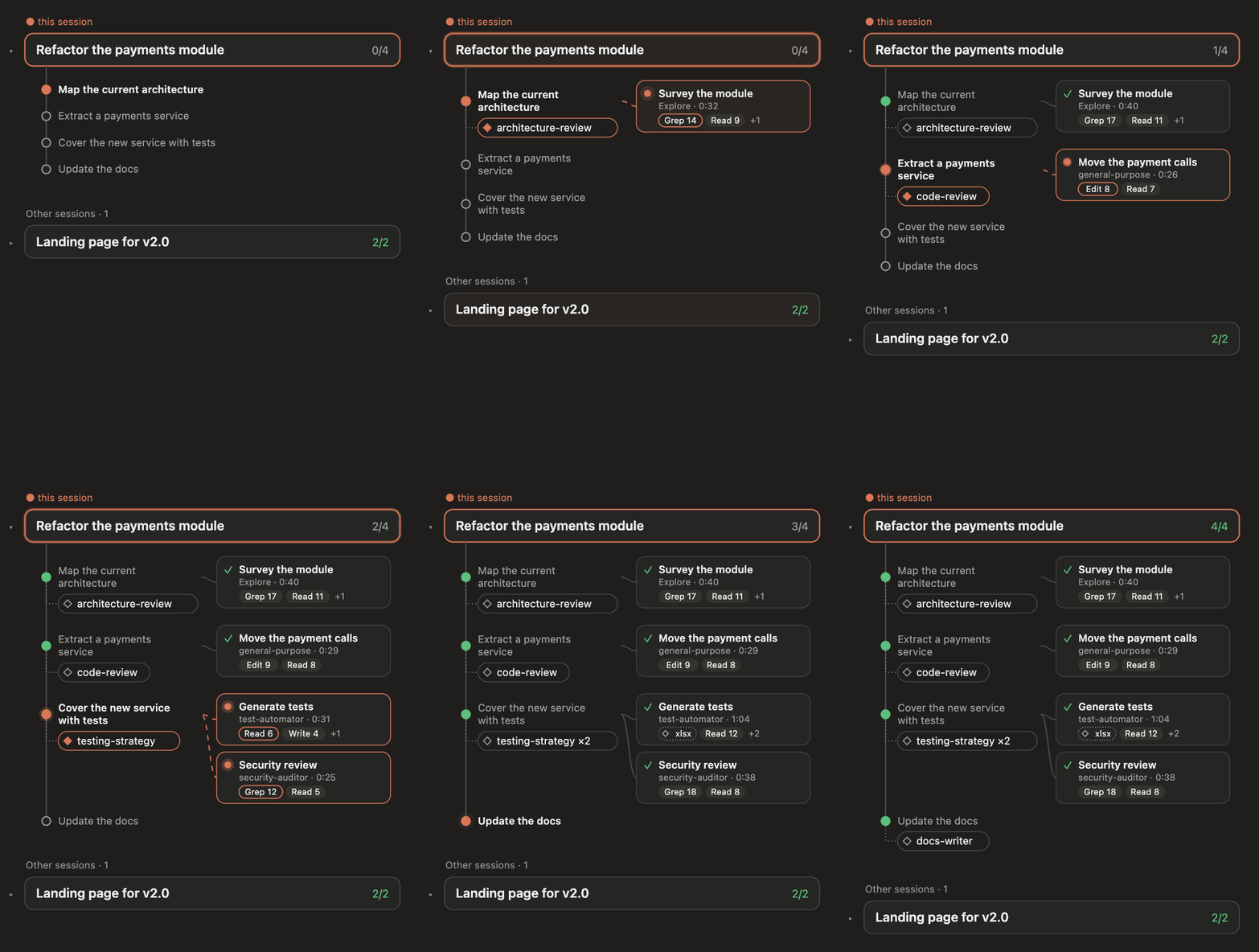
A live side pane for Claude Code that shows what your agents are doing — the plan each session is working through, the subagents it spawned, the skills it called and the tools they use — across every open session, as a list or as a graph.
What you get
- Every session in one place. Each open Claude Code session publishes its state; the pane shows them all, with yours framed on top and the others below, each foldable.
- Plans, live. The step list Claude keeps for a task, with the current step pulsing. Replaced plans are kept under Past plans, dropped steps struck through.
- Subagents where they belong. Each subagent hangs off the plan step it was spawned under, with its status, running time and its busiest tools (
Grep 21,Read 7…). The tool it is using right now is outlined. - Skills too. Skills the conversation calls appear as pills under their step (◆ active, ◇ used, red on error,
×2when repeated); skills a subagent calls sit on its card. - List or graph. A compact list for narrow panes, or an animated graph: flowing edges to running agents, pulsing steps.
- Token usage. Each subagent shows the tokens it has used (
142.8k tokens), and each session the tokens in its context window (152.4k in context). Turn it off under ⚙. Per-subagent counts need a Claude Code build that reports them; on older builds only the session's count shows. - Codex and Gemini too. When Claude (or one of its subagents) runs
codexorgeminithrough Bash, the run gets a card of its own, with its model and tokens, and the agents it spawns hang under it, and theirs under them. - Who is working, who waits for you. A session at work (a subagent running or a plan step in progress) has a soft glint sweeping along the bottom of its frame in the graph. A session waiting on you (a permission dialog, a question, or a turn that ended on a question) knocks twice and rests, and says
● waiting for youin the list. - Filters.
● Plans ● Agents ● Skills— turn any of them off. With plans off the graph becomes a timeline. - All-time statistics. Which skills and subagent types you use most, counted from every transcript on your machine.
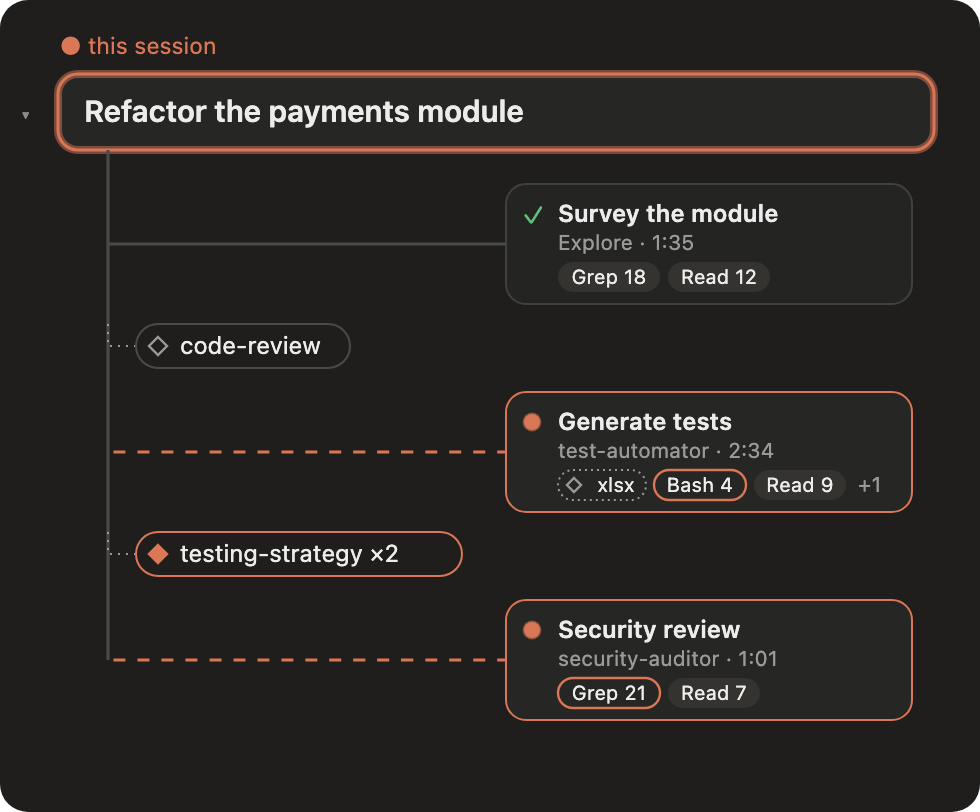 Plans filtered out: the trunk becomes a time axis. |
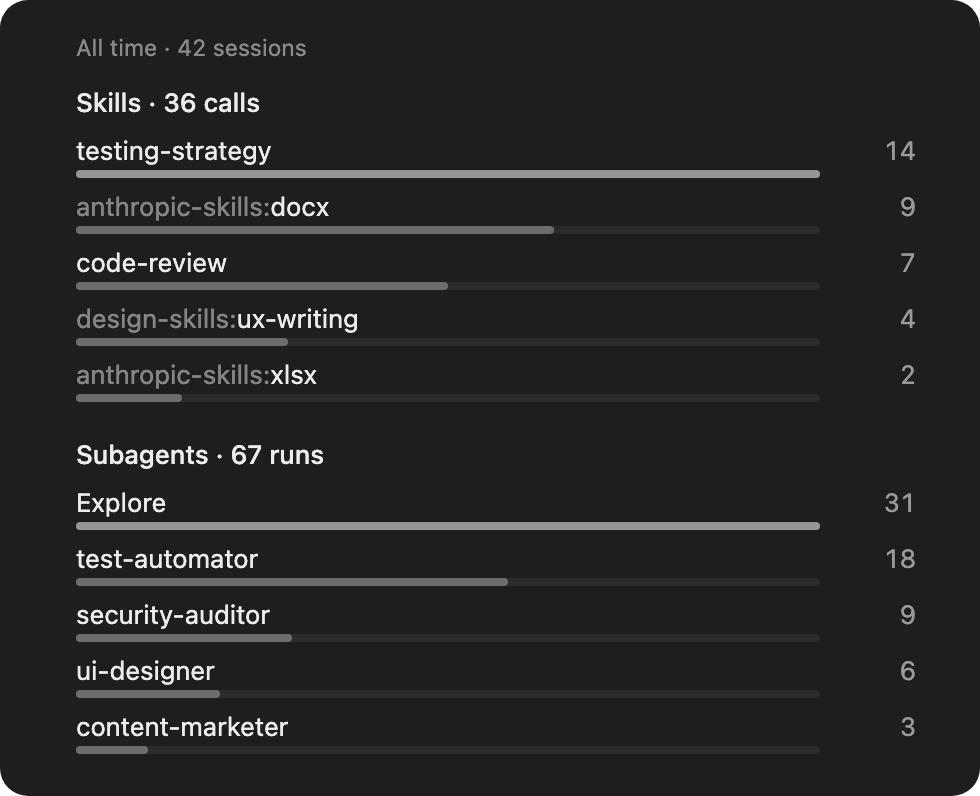 Statistics, opened from the bottom-right corner. |
The animation and screenshots use made-up demo data.
What's new in 0.4
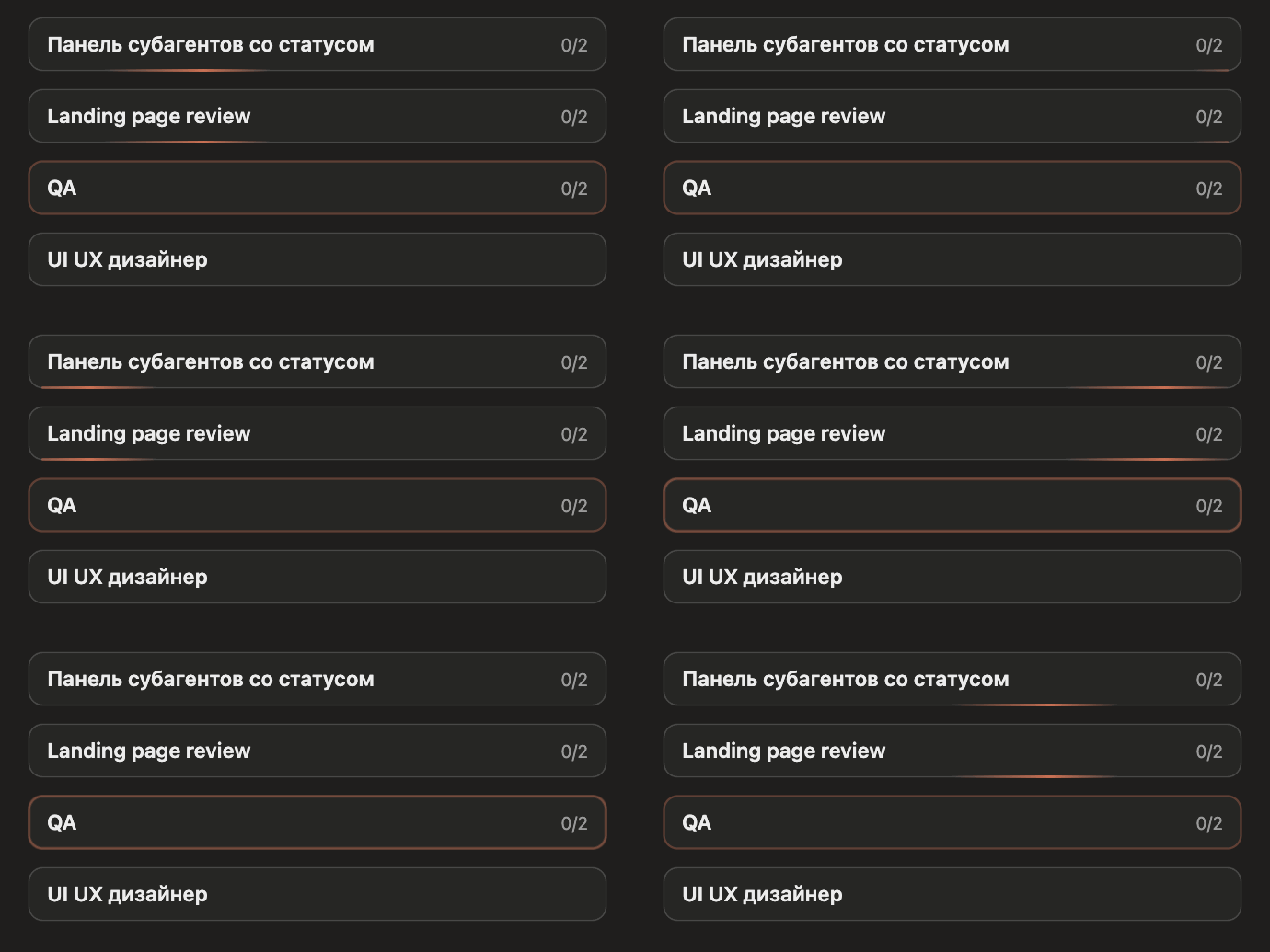
- Working sessions glint. A soft glint sweeps along the bottom of every session at work.
- Sessions that need you knock. A permission dialog, a question, or a turn that ended on a question makes the frame knock twice, then rest. The list says
● waiting for you. - Working sessions come first. Other sessions at work are listed above idle ones.
- Less clutter. Finished subagents that ran outside a plan step fold under
▸ Finished subagentsonce you send the next message. - Token usage, Codex and Gemini (0.2–0.3): see above.
Full notes on the releases page.
Install
At the prompt of a Claude Code terminal session:
/plugin install subagents-pane --marketplace qaokss/claude-agents-viewAnswer y to add the marketplace, then pick a scope (user scope loads it in every session).
From a shell:
claude plugin install subagents-pane --marketplace qaokss/claude-agents-viewIn the Claude desktop app, where /plugin does not run: click + next to the prompt box → Plugins → Add marketplace with qaokss/claude-agents-view → Add plugin.
The pane opens by itself when a session starts. If you close it, bring it back with:
/agents-view(/subagents does the same.)
Using it
| Control | Where | What it does |
|---|---|---|
List │ Graph |
top right | Switches the view. The graph needs the desktop or mobile app; the terminal shows the list. |
⚙ |
top right | Settings: ● Token usage shows or hides token counts. |
● Plans ● Agents ● Skills |
under it | Shows or hides each kind, for all sessions at once. |
▸ / ▾ |
left of a session | Folds what hangs off a session; its name stays. |
collapse all |
above other sessions | Folds or unfolds every other session. |
▸ Past plans, ▸ Finished subagents, ▸ Used skills |
inside a session | Earlier work, folded by default. In the graph, subagents that ran outside a plan step fold under ▸ Finished subagents once you send the next message or a new plan starts. |
Statistics ▴ |
bottom right | Opens the all-time ranking of skills and subagent types. |
Folds, the chosen view, filters and settings are remembered per session.
How it works
It is a Claude Code hooks module (hooks/register.tsx) — no server, no network.
- Plans come from Claude's own task-list tool calls; subagents from
agent.spawnand their turns; skills fromSkilltool calls; tool counts from each subagent's tool calls. - Sharing between sessions: every session writes a small JSON snapshot to
~/.claude/mods-data/subagents-pane/sessions/once a second when something changes (and a heartbeat every 30 s). The pane reads the others' snapshots, listing sessions at work (a subagent running or a plan step in progress) first; a session that stops updating disappears after 90 s. - Tokens come from the engine: a subagent's
tokenCountin$.agent.list()(its latest request's input plus all its output, the figure Claude Code's own agent list shows), the session's from$.session.usage(). - Codex and Gemini runs are Bash calls whose command starts
codex,gemini,npx @openai/codexornpx @google/gemini-cli. Neither CLI reports to Claude Code, so the pane reads the session log each one keeps, only the new part (tail -c +N) every 3 s while the run lasts: Codex's$CODEX_HOME/sessions/YYYY/MM/DD/rollout-*.jsonl(session_meta,token_count,task_complete; a subagent's log names its parent thread) and Gemini's~/.gemini/tmp/<project>/chats/session-*.jsonl(per-messagetokens; a subagent's chat sits inchats/<parent session>/). A run's log is the first one its CLI began, after the call, in the folder the command works in (cd … &&, Codex's-C). Tokens are counted as for Claude: the last request's input plus all output. A run in the foreground ends when its Bash call returns; in the background, at Codex'stask_complete, or once a Gemini chat ends on the model's answer and stays still for 20 s. - Session names are the chat titles Claude Code keeps next to each transcript (
custom-title.json). - Statistics scan your transcripts in
~/.claude/projectswithgrepwhile the statistics card is open (every 30 s), counting eachSkillandAgentcall once. - Pictures in graph view are SVGs drawn by
hooks/graph.ts, animated with SMIL, sized to the pane.
Everything stays on your machine.
Development
claude plugin validate .
claude plugin test .
Tests live in tests/pane.test.tsx and run the module against the engine with mocked clock, files and processes.
Built and tested with Claude Code 2.1.321–2.1.325. The hooks-module API is in early access and may change between releases.
License
Agents, skills & plans
A live side pane for Claude Code that shows what your agents are doing — the plan each session is working through, the subagents it spawned, the skills it called and the tools they use — across every open session, as a list or as a graph.
What you get
- Every session in one place. Each open Claude Code session publishes its state; the pane shows them all, with yours framed on top and the others below, each foldable.
- Plans, live. The step list Claude keeps for a task, with the current step pulsing. Replaced plans are kept under Past plans, dropped steps struck through.
- Subagents where they belong. Each subagent hangs off the plan step it was spawned under, with its status, running time and its busiest tools (
Grep 21,Read 7…). The tool it is using right now is outlined. - Skills too. Skills the conversation calls appear as pills under their step (◆ active, ◇ used, red on error,
×2when repeated); skills a subagent calls sit on its card. - List or graph. A compact list for narrow panes, or an animated graph: flowing edges to running agents, pulsing steps.
- Token usage. Each subagent shows the tokens it has used (
142.8k tokens), and each session the tokens in its context window (152.4k in context). Turn it off under ⚙. Per-subagent counts need a Claude Code build that reports them; on older builds only the session's count shows. - Codex and Gemini too. When Claude (or one of its subagents) runs
codexorgeminithrough Bash, the run gets a card of its own, with its model and tokens, and the agents it spawns hang under it, and theirs under them. - Who is working, who waits for you. A session at work (a subagent running or a plan step in progress) has a soft glint sweeping along the bottom of its frame in the graph. A session waiting on you (a permission dialog, a question, or a turn that ended on a question) knocks twice and rests, and says
● waiting for youin the list. - Filters.
● Plans ● Agents ● Skills— turn any of them off. With plans off the graph becomes a timeline. - All-time statistics. Which skills and subagent types you use most, counted from every transcript on your machine.
Plans filtered out: the trunk becomes a time axis. |
Statistics, opened from the bottom-right corner. |
The animation and screenshots use made-up demo data.
What's new in 0.4
- Working sessions glint. A soft glint sweeps along the bottom of every session at work.
- Sessions that need you knock. A permission dialog, a question, or a turn that ended on a question makes the frame knock twice, then rest. The list says
● waiting for you. - Working sessions come first. Other sessions at work are listed above idle ones.
- Less clutter. Finished subagents that ran outside a plan step fold under
▸ Finished subagentsonce you send the next message. - Token usage, Codex and Gemini (0.2–0.3): see above.
Full notes on the releases page.
Install
At the prompt of a Claude Code terminal session:
/plugin install subagents-pane --marketplace qaokss/claude-agents-viewAnswer y to add the marketplace, then pick a scope (user scope loads it in every session).
From a shell:
claude plugin install subagents-pane --marketplace qaokss/claude-agents-viewIn the Claude desktop app, where /plugin does not run: click + next to the prompt box → Plugins → Add marketplace with qaokss/claude-agents-view → Add plugin.
The pane opens by itself when a session starts. If you close it, bring it back with:
/agents-view(/subagents does the same.)
Using it
| Control | Where | What it does |
|---|---|---|
List │ Graph |
top right | Switches the view. The graph needs the desktop or mobile app; the terminal shows the list. |
⚙ |
top right | Settings: ● Token usage shows or hides token counts. |
● Plans ● Agents ● Skills |
under it | Shows or hides each kind, for all sessions at once. |
▸ / ▾ |
left of a session | Folds what hangs off a session; its name stays. |
collapse all |
above other sessions | Folds or unfolds every other session. |
▸ Past plans, ▸ Finished subagents, ▸ Used skills |
inside a session | Earlier work, folded by default. In the graph, subagents that ran outside a plan step fold under ▸ Finished subagents once you send the next message or a new plan starts. |
Statistics ▴ |
bottom right | Opens the all-time ranking of skills and subagent types. |
Folds, the chosen view, filters and settings are remembered per session.
How it works
It is a Claude Code hooks module (hooks/register.tsx) — no server, no network.
- Plans come from Claude's own task-list tool calls; subagents from
agent.spawnand their turns; skills fromSkilltool calls; tool counts from each subagent's tool calls. - Sharing between sessions: every session writes a small JSON snapshot to
~/.claude/mods-data/subagents-pane/sessions/once a second when something changes (and a heartbeat every 30 s). The pane reads the others' snapshots, listing sessions at work (a subagent running or a plan step in progress) first; a session that stops updating disappears after 90 s. - Tokens come from the engine: a subagent's
tokenCountin$.agent.list()(its latest request's input plus all its output, the figure Claude Code's own agent list shows), the session's from$.session.usage(). - Codex and Gemini runs are Bash calls whose command starts
codex,gemini,npx @openai/codexornpx @google/gemini-cli. Neither CLI reports to Claude Code, so the pane reads the session log each one keeps, only the new part (tail -c +N) every 3 s while the run lasts: Codex's$CODEX_HOME/sessions/YYYY/MM/DD/rollout-*.jsonl(session_meta,token_count,task_complete; a subagent's log names its parent thread) and Gemini's~/.gemini/tmp/<project>/chats/session-*.jsonl(per-messagetokens; a subagent's chat sits inchats/<parent session>/). A run's log is the first one its CLI began, after the call, in the folder the command works in (cd … &&, Codex's-C). Tokens are counted as for Claude: the last request's input plus all output. A run in the foreground ends when its Bash call returns; in the background, at Codex'stask_complete, or once a Gemini chat ends on the model's answer and stays still for 20 s. - Session names are the chat titles Claude Code keeps next to each transcript (
custom-title.json). - Statistics scan your transcripts in
~/.claude/projectswithgrepwhile the statistics card is open (every 30 s), counting eachSkillandAgentcall once. - Pictures in graph view are SVGs drawn by
hooks/graph.ts, animated with SMIL, sized to the pane.
Everything stays on your machine.
Development
claude plugin validate .
claude plugin test .
Tests live in tests/pane.test.tsx and run the module against the engine with mocked clock, files and processes.
Built and tested with Claude Code 2.1.321–2.1.325. The hooks-module API is in early access and may change between releases.
License
Scanned by  NVIDIA SkillSpector
Automated static analysis (no LLM) · v2.12.0 · 2026-11-20
Partial analysis: some checks could not run on this component.
6 observations in 2 categories
- MCP Rug Pull 5
- MCP Least Privilege 1
SkillSpector looks for patterns such as shell commands, credential access, network calls or unpinned dependencies. An observation is something worth reading in the files before you install, not a confirmed vulnerability. Components that run code locally, like hooks, MCP servers and security tooling, naturally show more of them. Open one to see the lines it points at.
npx commands without a version suffix (e.g. @1.0.0) create a rug-pull risk if the upstream server is compromised and publishes a malicious update. ×2MCP Rug Pull · README.md:92
| 90 | - **Sharing between sessions:** every session writes a small JSON snapshot to `~/.claude/mods-data/subagents-pane/sessions/` once a second when something changes (and a heartbeat every 30 s). The pane reads the others' snapshots, listing se |
| 91 | - **Tokens** come from the engine: a subagent's `tokenCount` in `$.agent.list()` (its latest request's input plus all its output, the figure Claude Code's own agent list shows), the session's from `$.session.usage()`. |
| 92 | - **Codex and Gemini runs** are Bash calls whose command starts `codex`, `gemini`, `npx @openai/codex` or `npx @google/gemini-cli`. Neither CLI reports to Claude Code, so the pane reads the session log each one keeps, only the new part (`ta |
| 93 | - **Session names** are the chat titles Claude Code keeps next to each transcript (`custom-title.json`). |
| 94 | - **Statistics** scan your transcripts in `~/.claude/projects` with `grep` while the statistics card is open (every 30 s), counting each `Skill` and `Agent` call once. |
npx commands without a version suffix (e.g. @1.0.0) create a rug-pull risk if the upstream server is compromised and publishes a malicious update. ×3MCP Rug Pull · tests/pane.test.tsx:617
| 615 | test('only commands that run Codex or Gemini count as runs', async () => { |
| 616 | expect(vendorOf('codex exec "x"')).toBe('codex') |
| 617 | expect(vendorOf('cd a && npx @openai/codex@latest exec x')).toBe('codex') |
| 618 | expect(vendorOf('gemini -p "x" --output-format json')).toBe('gemini') |
| 619 | expect(vendorOf('npx -y @google/gemini-cli -p hi')).toBe('gemini') |
Without declared permissions the skill's intent is opaque and cannot be validated.MCP Least Privilege · SKILL.md:1
Code excerpt not available for this observation.
Learn more about NVIDIA SkillSpector or how components are reviewed.